 f9fcf19afa
|
||
|---|---|---|
| LICENSE | ||
| README.md | ||
| index.html | ||
| remote_instance_actions.user.js | ||
| ria.png | ||
| scripts.js | ||
| style.css | ||

README.md
Remote Instance Actions
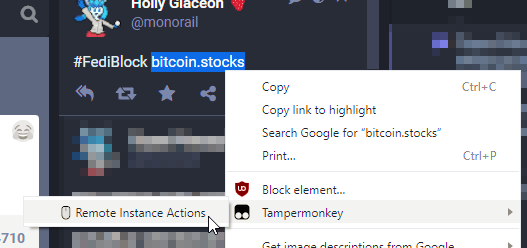
Quickly suspend or silence remote instances from the Mastodon frontend
What is this?
A userscript to make blocking remote instances on Mastodon a less tedious and time-consuming task.
How do I install it?
First, install Tampermonkey. Then, visit the installation website.
Why have a whole installation website for a userscript?
It fills in the @match directives for whatever instances are relevant to the user, using GET parameters so Tampermonkey's update functionality will continue to work.
Why is there PHP in a .user.js file?
For the same reason as the last question. That's how the @match directives are filled in with the GET parameters. The file has to have the .user.js extension so that Tampermonkey will prompt the user to install it, which means I had to go into the PHP configuration files and allow it to execute .js files as PHP. It's a little cursed but it does work.
TODO
Figure out why it doesn't work on FirefoxIt's because the@run-at context-menuheader only works in Chrome based browsers. The context menu item appears in Firefox but doesn't do anything. Find a workaraound- It's actually because of something extremely different and much, much weirder.
@run-at context-menuactually does exist in Firefox now, but there's a bizarre CSP enforcement bug that causes Firefox issues. Details on the installation page
- It's actually because of something extremely different and much, much weirder.
- Don't rely on parsing human-readable text, won't work in other languages
- There's no good API or anything for this, going to need to parse the document structure